Device Documents & Desired State
Every device, fleet, and configuration in Admiral has a single document: one place that says what the device should be running (spec) and what it is running (status). You can read it in the dashboard, edit it from the CLI, keep it in Git, and apply it back. A robot that was offline for a week converges on the latest document when it reconnects; nothing is lost in a queue of one-off commands.
Documents follow the same shape as Kubernetes resources (apiVersion, kind, metadata, spec, status), so they work with the tools and review habits your team already has.
The Device Document
apiVersion: admrl.co/v1
kind: Device
metadata:
  id: 3f6c1d2e-...            # immutable device UUID
  name: amr-dock-07
  fleet: 9a41...              # current fleet
  generation: 14              # bumps on every spec change
  resourceVersion: "..."      # use for optimistic concurrency (If-Match)
  labels:
    site: warehouse-east
spec:
  fleet: 9a41...              # change this to move the device to another fleet
  workload:
    from:
      configuration: navigation-stack
      version: 7              # or "latest"
    override:                 # per-device changes merged over the configuration
      environment:
        LIDAR_PORT: /dev/ttyUSB1
    expiresAt: null           # optional: drop the override at this time
  network: null               # device-level network settings, if any
  system:
    screenshots: enabled
  secrets:
    - path: /etc/robot/calibration.json
      ref: ...
status:
  observedGeneration: 14      # the generation the device has applied
  renderedRevision: 5e0c9a1b2f44
  conditions: [...]           # see Device State & Diagnostics
  presence: { online: true, lastSeenAt: ..., latencyMs: 38, transport: tcp }
| Field | Meaning |
|---|---|
metadata.generation | Increases every time anything in spec changes, whoever changed it (dashboard, CLI, API, a rollout). |
status.observedGeneration | The generation the device has applied. When it equals metadata.generation, the device has converged: it runs exactly what the document says. |
status.renderedRevision | A short fingerprint of the exact desired state the device last applied. Two devices with the same revision run the same thing. |
status.conditions | The device's own verdicts (Converged, WorkloadReady, StorageOK, and so on). See Device State & Diagnostics. |
status.localOverride | Present when someone changed settings on the device itself. See Local Overrides. |
status is read-only. Edits to it are ignored.
Fleet and Configuration documents
kind: Fleet: the configuration and version the fleet runs (spec.configuration), update policy, signature policy, security requirements, USB policy, network, and features. Itsstatus.devicescounts total, online, converged, crashing, and stuck devices.kind: Configuration: the configuration's spec (image, environment, mounts, volumes, options). Itsstatuslists versions and how many devices run each one.
Changing a fleet's configuration version in its document changes it for every device in the fleet at once. To stage the change, use a rollout instead.
The Document Tab
Open a device and choose Workload > Document.
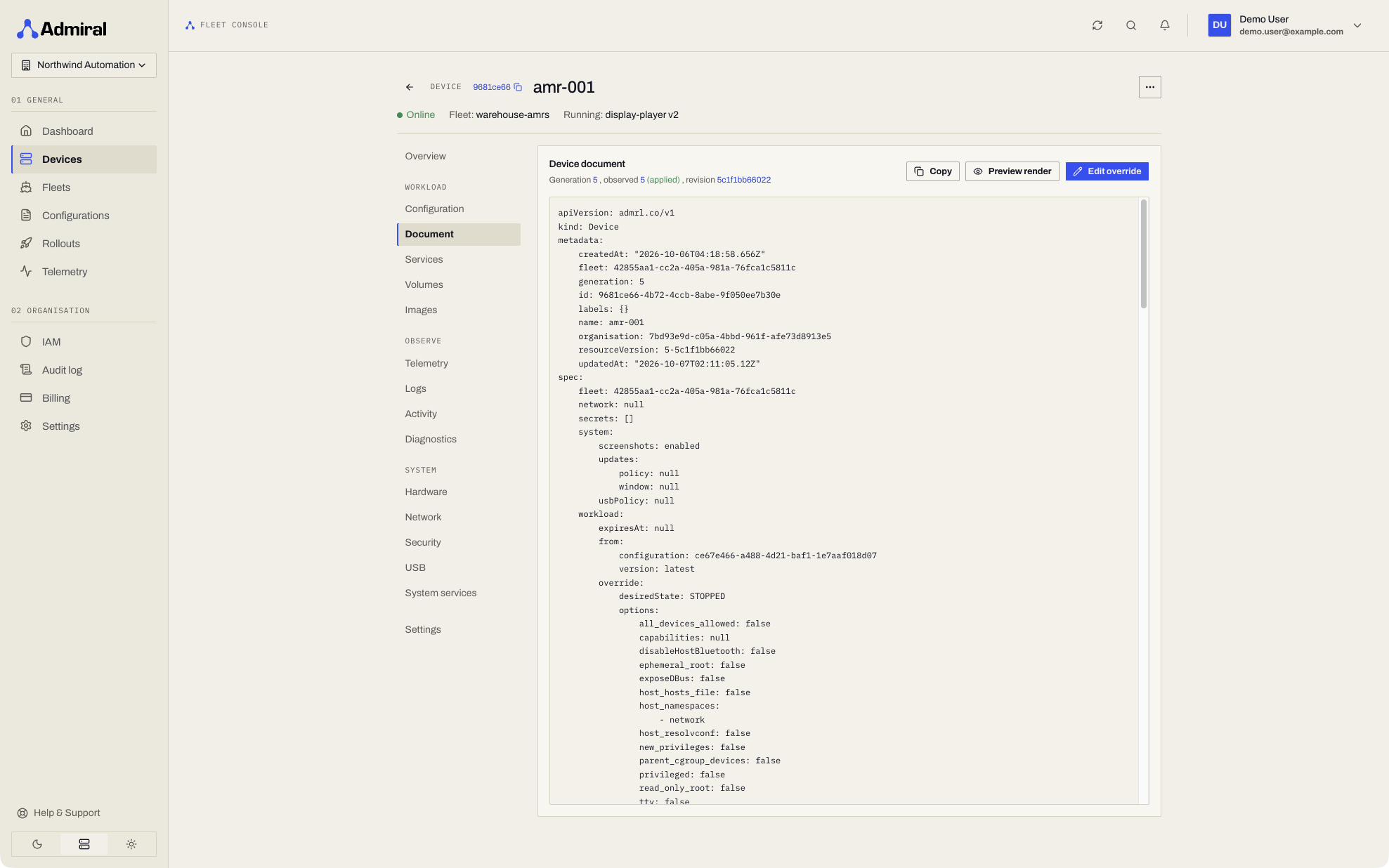
- The header shows Generation, observed generation and whether the latest change is applied or not yet applied, plus the rendered revision.
- Copy copies the whole document.
- Preview render shows what the device would receive next, compared with what it last applied. No difference from what the device last applied means the device is converged.
- Edit override opens the device's workload override (JSON, merged over the fleet configuration). Preview changes shows the effect before you save; Save override writes it and the device receives the new configuration straight away.
If someone else changed the device while you were editing, saving shows Someone else changed this device since you opened it. Choose Reload to fetch the latest version; your edit stays in the editor so you can re-apply it.
The Configuration tab still shows the merged configuration and per-device overrides in form view. The Document tab is the same data as one reviewable file.
Working with Documents from the CLI
The Admiral CLI reads and writes documents directly. Devices, fleets, and configurations can be referred to by name or ID.
admrl use-org <organisation-id>             # once: pick the organisation

admrl get devices -l site=warehouse-east -o wide
admrl get device amr-dock-07 -o yaml > amr-dock-07.yaml

admrl edit device amr-dock-07               # opens $EDITOR, shows the render diff, asks to confirm
admrl diff -f amr-dock-07.yaml              # what would change on the device
admrl apply -f amr-dock-07.yaml --dry-run   # server-side validation and render diff only
admrl apply -f amr-dock-07.yaml             # write it

admrl move device amr-dock-07 --fleet production-east
admrl override device amr-dock-07 --set env.LOG_LEVEL=debug --expires 2h
admrl override device amr-dock-07 --clear
admrl watch device amr-dock-07              # live condition, workload and progress changes
- Safe concurrent edits:
applyandeditsend the document'sresourceVersion. If the device changed since you fetched it, the command stops with exit code3(conflict) instead of overwriting someone else's change. Fetch again and re-apply. - Validation before write: invalid documents are rejected with the server's message; nothing is pushed.
- Temporary overrides:
--expires 2hdrops the override automatically, which suits a debug log level or a test image on one robot. - GitOps: keep fleet and device documents in a repository, review changes as pull requests, and run
admrl diff/admrl applyfrom CI with a service account.
Local Overrides: Settings Changed on the Device
Sometimes a technician on site has to change a setting directly on the device, for example joining a new Wi-Fi network from the on-device console or the Bluetooth app because the old one is gone. That change is a local override: it is merged over what Admiral Cloud assigned and it wins, so the device stays connected.
Only these settings can be overridden on the device: network, diagnostics mode, and hostname. Workload, identity, secrets, and updates can only be changed from Admiral Cloud.
A local override survives reboots, reconnects, and new configuration pushes. While one is in effect, every device page shows a banner:
- The banner shows where the change was made (console, Bluetooth, and so on), when, which settings it covers, a summary of the network change, and the reason entered on site. Wi-Fi passwords are never shown; they appear as set.
- Adopt copies the on-site settings into the device's document, so Admiral Cloud now assigns them. The device then clears its local copy by itself.
- Discard tells the device to drop the on-site settings and return to what is assigned here. Because the on-site change may be what keeps the device online, Discard asks for confirmation: the device can lose connectivity and may need someone on site to reconnect it.
If Admiral Cloud is later updated to match the on-site change by any route, the device notices and clears its local override automatically. Adopt and Discard are recorded in the audit log.
API
All document endpoints take the X-Organization-ID header (see the REST API reference). A typical read, preview, and write:
# Read as YAML; note the ETag
curl -si "https://api.admrl.co/v1/devices/$DEVICE_ID/document" \
  -H "X-Organization-ID: $ORG_ID" \
  -H "Authorization: Bearer ***" \
  -H "Accept: application/yaml"

# Preview a change without writing it
curl -s -X POST "https://api.admrl.co/v1/devices/$DEVICE_ID/document:render" \
  -H "X-Organization-ID: $ORG_ID" \
  -H "Authorization: Bearer ***" \
  -H "Content-Type: application/json" \
  -d '{"spec":{"workload":{"override":{"environment":{"LOG_LEVEL":"debug"}}}}}'

# Write it, only if nobody changed the device since the ETag was read
curl -s -X PATCH "https://api.admrl.co/v1/devices/$DEVICE_ID/document" \
  -H "X-Organization-ID: $ORG_ID" \
  -H "Authorization: Bearer ***" \
  -H "Content-Type: application/merge-patch+json" \
  -H "If-Match: $ETAG" \
  -d '{"spec":{"workload":{"override":{"environment":{"LOG_LEVEL":"debug"}}}}}'
A stale If-Match returns 409; a document that fails validation returns 400 and nothing is pushed.
| Method and path | Purpose |
|---|---|
GET /v1/devices/{id}/document | Read the document. Accept: application/yaml or application/json. Returns an ETag. |
PUT /v1/devices/{id}/document | Replace the spec. Send If-Match: <ETag>; 409 if it changed since. |
PATCH /v1/devices/{id}/document | JSON merge patch (application/merge-patch+json), e.g. {"spec":{"fleet":"<fleet-id>"}}. |
POST /v1/devices/{id}/document:render | Dry-run render: the desired state the device would receive (secrets stripped), its revision, and a diff against what the device last applied. Send a candidate document as the body to preview a change before writing it. |
POST /v1/devices/{id}/document:adoptLocalOverride | Adopt the device's local override into its spec. |
POST /v1/devices/{id}/document:discardLocalOverride | Tell the device to drop its local override. Body {"paths":["*"]} or specific paths. |
GET/PUT/PATCH /v1/fleets/{id}/document, POST .../document:render | Same for fleets. A fleet render returns the per-device diff, i.e. a rollout preview. |
GET/PUT/PATCH /v1/configurations/{id}/document, POST .../document:render | Same for configurations. |
Devices on earlier Admiral OS releases still get the same configuration from the same document, and their status is filled in from what they report. Local overrides, the full condition set, and live progress need a current Admiral OS release.