Plans & Billing
Every Admiral plan runs the full fleet platform. Telemetry is an add-on that an organisation switches on from Billing, security and compliance controls come with an Enterprise account, and AirDetect is enabled per fleet and billed on usage.
How Pricing Works
Admiral is billed per device, per month, on a graduated scale: the first 5 devices on every account are free, and the per-device rate falls as the fleet grows. Current prices are on the pricing page. Telemetry and AirDetect are billed on top as add-ons and usage.
An Enterprise account adds the security and compliance controls listed below, and can have custom pricing and invoicing terms. Contact sales.
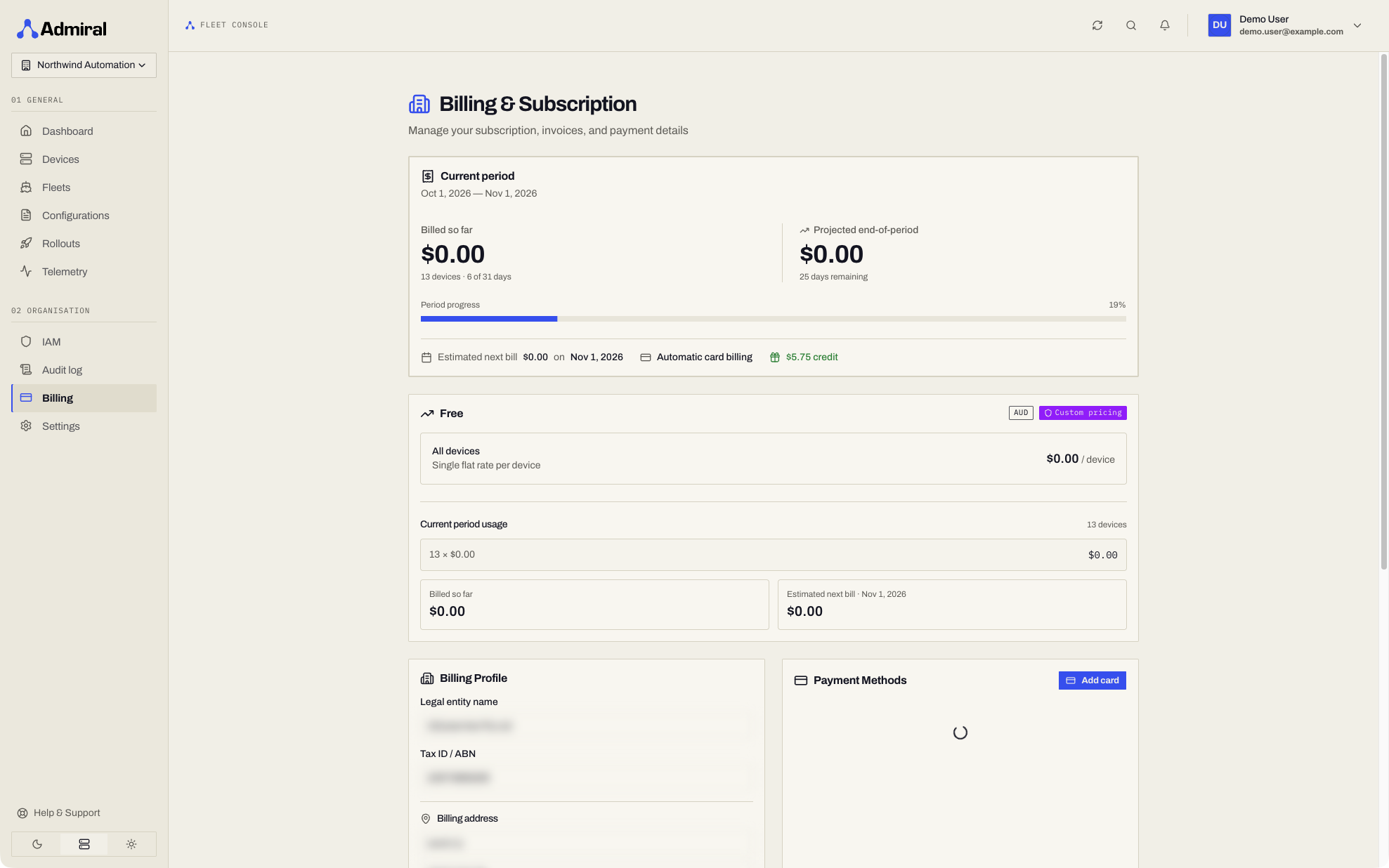
The Billing Page
Open Billing (https://app.admrl.co/billing) from the sidebar. It has five tabs:
| Tab | What it shows |
|---|---|
| Overview | Progress through the current billing period (or trial) and the estimated next bill. |
| Plan & add-ons | Your per-device pricing, and the add-ons switched on for the organisation. |
| Usage | Usage for the period, broken down into devices, the Telemetry add-on, AirDetect, and other usage. |
| Invoices | Past invoices with amount and status. |
| Payment & details | Payment methods, legal entity name, tax ID / ABN, and billing address. |
What Is Included
| Capability | Availability |
|---|---|
| Fleet management, configurations, system updates, rollouts, maintenance windows | Included |
| Real-time device logs, diagnostics, SSH and remote access | Included |
| Platform API, API tokens, service accounts and event webhooks | Included |
| Passkeys, 2FA, users, groups and IAM policies | Included |
| Device and fleet health (CPU, memory, disk, temperature) for the last 24 hours | Included |
| Built-in platform alerts, notified in the app | Included |
| Metric and log history beyond 24 hours, and the MetricsQL explorer | Telemetry add-on |
| Log search across several devices or a whole fleet, with live tail | Telemetry add-on |
| Custom alert rules | Telemetry add-on |
| Webhook delivery of alerts (platform alerts and your rules) | Telemetry add-on |
| Telemetry API with API tokens and service accounts | Telemetry add-on |
| Image signature policies (organisation, fleet and configuration) | Enterprise |
| USB policies (fleet and device) | Enterprise |
| Organisation audit log | Enterprise |
| AirDetect presence detection | Enabled per fleet, usage-based |
See Telemetry, Alerts & Alert Rules, Account Security & Audit and AirDetect for each feature.
Turning an Add-on On or Off
- Open Billing (
https://app.admrl.co/billing). - In Add-ons, switch on Telemetry.
Only organisation billing admins can change add-ons. Other members see what is enabled, and locked features in the dashboard ask them to contact a billing admin. Add-ons apply to the whole organisation. Billing must be set up for the organisation before an add-on can be enabled.
Signature policies, USB policies and the audit log are not self-serve: they come with an Enterprise account, which Admiral sets up. Contact sales to upgrade.
When a Feature Is Not Enabled
The dashboard shows the feature as locked, with what the add-on includes and a link to Billing (or Contact sales for Enterprise). Everything that is included keeps working.
| Feature | Without it |
|---|---|
| Telemetry | Charts, metric queries and log searches reach back 24 hours; longer ranges are locked. Log search covers one device at a time. New alert rules cannot be created or edited, and existing rules stop being evaluated until the add-on is on again (they are kept, and can still be deleted). Alerts are not delivered to webhooks; platform alerts still notify in the app. API tokens and service accounts cannot query telemetry. |
| Signature policy (Enterprise) | Signature policies cannot be viewed or set, and devices do not enforce one. Saved policies are kept and apply again when the account is Enterprise. |
| USB policy (Enterprise) | USB policies cannot be viewed or set, and devices run with no USB policy. The list of attached USB devices is still shown. Saved policies are kept and apply again when the account is Enterprise. |
| Audit log | The audit log is not available. Actions are still recorded. |
| AirDetect | The fleet's AirDetect pages offer Enable AirDetect. |
Turning an add-on on or off, or a change of Enterprise status, takes effect within about a minute. Devices receive the new signature or USB policy on their next update from the platform.
For API Users
A request for a feature the organisation has not enabled returns HTTP 402 Payment Required, with the header X-Admiral-Billing-Required naming the feature and a body like:
{
  "success": false,
  "code": 402,
  "msg": "History beyond the last 24 hours requires the Telemetry add-on.",
  "data": {
    "error": "billing_required",
    "feature": "telemetry",
    "reason": "telemetry_window",
    "self_serve": true,
    "free_window_hours": 24,
    "upgrade_url": "/billing?feature=telemetry",
    "message": "History beyond the last 24 hours requires the Telemetry add-on."
  }
}
feature | Meaning |
|---|---|
telemetry | Telemetry add-on |
signature_policy | Enterprise account (self_serve is false) |
usb_policy | Enterprise account (self_serve is false) |
audit_log | Enterprise account (self_serve is false) |
airdetect | AirDetect is not enabled on the fleet, or the account is suspended |
reason | Meaning |
|---|---|
feature_not_enabled | The add-on is off. Enable it in Billing. |
telemetry_window | The query reaches further back than the last 24 hours. |
telemetry_scope | The query needs the add-on, for example a log search across more than one device. |
telemetry_api | Telemetry was queried with an API token or service account. |
enterprise_required | The feature needs an Enterprise account. |
feature_fleet_scoped | Enable the feature on the fleet. |
account_suspended | The account is suspended for billing. |
Read and change add-ons with:
| Endpoint | Purpose |
|---|---|
GET /v1/billing/features | What is enabled for the organisation, whether it is Enterprise, and the free telemetry window. |
PUT /v1/billing/features/{feature} | Turn telemetry on or off with {"enabled": true}. Requires billing admin. Enterprise features answer 400. |